Archiving CygNet Measurement Data
In the CygNet Measurement system, and its companion product CygNet Dispatch when used, archiving is handled by running an Archive Data system command to move device data records that are older than a specified retention period from the FMS database to a specified offline archive file location. These user-specified values are defined using FMS service configuration file keywords. The Archive Data command can be performed manually or it can be scheduled using CygNet Explorer (via the MSS service), to trigger the archive process to remove the specified device data from the measurement system and store it on an alternative storage medium.
Archiving device data from your system makes more space available in your FMS database by moving monthly increments of records prior to the retention period to the off-site storage location. The FMS records are stored in archived monthly files at the specified location, where they are still available for access and viewing by running a CygNet Measurement reports command (not applicable to Balance or Missing Data report types).
Note: Archived files are stored based on a full month (using a first-of-the-month boundary), therefore a full month of data must be available before it will be archived. This means that retention dates falling in the middle of a month will wait for the next archive command (after the last-of-the-month boundary) to store that month's data.
In limited circumstances, depending on your system's operational mode and setup, alternatives to archiving data may be preferred.
Warning: Archived data is read-only. Once data is archived, it cannot be edited and new data cannot be brought into the system for the archived time period.
See Archive Data in the FMS Commands section for more information about enabling and using the Archive Data command.
See Scheduling FMS Command Tasks in the MSS for more information about scheduling the Archive Data command through CygNet Explorer (MSS).
See CxFms for more information about scripting commands.
FMS Archive Process
When you choose to archive FMS data, historical device data records in the FMS database (that are older than the specified data retention period) will be archived to a user-defined data storage location, leaving only newer data (within the specified retention period) in your database. This yields more available space in your FMS database, and still provides access to the archived data records (via FMS reports commands) when needed. The following diagram illustrates this process.
|
FMS Archive Process |
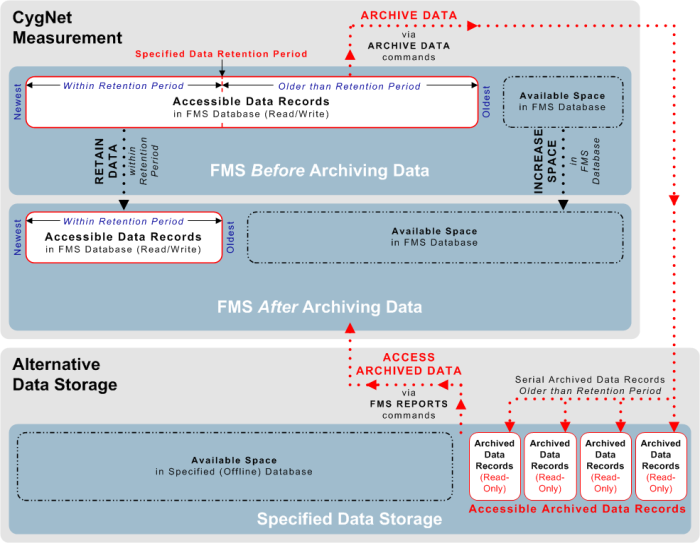
The archive process includes the following types of device data records.
- Periodic history
- Gas quality history
- Batch
- Ticket
- Product
- Configuration, event, and gas analysis
- Event
- Alarm
There are some differences to consider between the accessibility of records in your database versus records stored as archived files. Characteristics of the record types are compared in the following table.
| Characteristic | Records in FMS Database | Records in Archived Files |
|---|---|---|
|
Time period
|
Contains all records from device installation until the present time, unless deleted, purged, or archived |
Contains only records older than a specified data retention period |
|
Accessing data |
Records are read/write (excluding raw data) |
All records are read-only |
|
Viewing data |
Records are accessible for viewing via FMS Explorer or CygNet Studio as follows.
|
Records are accessible for viewing via FMS Explorer or CygNet Studio as follows.
|
|
Editing, adding data |
Records can be edited Additional data can come into the CygNet Measurement system via polling, file imports, etc., and can be incorporated into the records |
No editing allowed No additional data can come into CygNet Measurement for the archived time period |
|
Validating, estimating data |
Data can be validated, re-validated, estimated |
Data cannot be re-validated or estimated |
|
Reporting data |
Records can be reported out of the system via FMS Explorer or CygNet Studio as follows.
|
Records can be reported out of the system via FMS Explorer or CygNet Studio as follows.
|
|
Maximum data storage |
Limited by capacity of storage medium on which FMS database is located |
Limited by capacity of storage medium on which archived FMS data files are located |

Archiving FMS Records
To archive FMS records, you must first enable archiving in the FMS configuration file (CygNet\Services\FMS\fms.cfg), and then execute an Archive Data system command. Once data is archived, the archived data files are read only. Therefore, the data cannot be edited and new data cannot be brought into the system for the archived time period. See Archive Data for more information about the command.
Incremental Archiving
When a large amount of information is to be archived, it could take a lot of time and place a large processing burden on your system. Depending on how much data you have stored in your database and the capacity of your system resources, CygNet recommends that you archive the data in increments, from oldest to newest records. This decision can take into account the particular circumstances of your system, and the increment of time that will impact your workflow as little as possible.
Example
You have never archived data from your FMS database. The database is approaching capacity and you have two years (24 months) worth of measurement data, part of which you have decided to archive. After considering your system resources and workflow requirements, you determine that it is reasonable to archive 3 months worth of data at a time.
Run a series of incremental Archive Data commands, with varying data retention periods configured. First, archive with a retention period of 21 months, then 18 months, then 15 months, and so on, until you have reached the period for which you want to maintain records in your FMS database.
Once all desired data is archived to your chosen directory location, you can set the data retention period to the time period you'd like to retain in the database, and then schedule the Archive Data command to recur at an appropriate time each month, since you have determined the load that is effective for your system and workflow circumstances. If circumstances change, you can reset the data retention period, and/or the schedule for your Archive Data command, as desired at that time.
Viewing Archive Data Command Logs
When the Archive Data command is executed by the FMS service, a history of the command actions is logged by the system, at the level of detail configured for the command task. Command log history can be viewed in FMS Explorer. See Viewing Command Logs for more information.
Accessing and Viewing Archived Records
To access and view records after they have been archived, run a CygNet Measurement report for the desired time period to build a report containing the requested data (not applicable to Balance or Missing Data report types). If you request information for a time period that is unavailable in the archived files, an informational message will appear.
See Running CygNet Measurement Reports for more information.
Alternatives to Archiving Records
System usage determines how you want to handle older data in your system; whether you decide to archive or purge expired device data. The primary consideration is whether or not CygNet Measurement is used as your system of record for measurement data.
If CygNet Measurement is your system of record for measurement data (for example, your system operates in FULL mode), do the following.
- Use the Archive Data command to manage data in a manner that will provide future access to the data via FMS reports. See Archive Data for more information.
If CygNet Measurement is not your system of record for measurement data (for example, your system operates in REPOSITORY mode), do either of the following. (Although you may not technically need archiving for this circumstance, you can still choose to archive historical records if you choose not to purge them from your system.)
- Use the Archive Data command to manage data in a manner that will provide future access to the data via FMS reports. See Archive Data for more information.
- Use the Perform Database Maintenance system command to perform database tasks in your CygNet Measurement system, and set its Purge expired device data property to Yes. Deleting expired device data from the database is an optional part of the command. See Perform Database Maintenance for more information.

